

You are currently on the Europe-English site.
Select a location to view location-specific content and shop online.
Razer Back-To-School Kits: Enjoy upsized education perks, plus bonus Razer skin with any eligible Razer Blade purchase. Shop Now
Description not needed: The visuals in this video animation only support what is spoken; the visuals do not provide additional information.
RAZER™ HALL EFFECT MAGNETIC SWITCHES
Rapid Trigger and Adjustable Actuation
Description not needed: The visuals in this video animation only support what is spoken; the visuals do not provide additional information.
This is a carousel with highlighted items. Use the Previous and Next buttons to browse through 4 slides.


* Assuming factory default 2.0MM actuation point
End of carousel
Actuation Point Precision & Accuracy
TRUE 8000 HZ HYPERPOLLING
Near-zero Latency
Description not needed: The visuals in this video animation only support what is spoken; the visuals do not provide additional information.
* Testing was done across 20 measurements with all keyboards set to 0.1 mm actuation and 8000 Hz polling rate. Percentage is rounded to the nearest whole number.
** Latency is measured from the moment of actuation of the switch to the signal being received at the USB port on the host device. End-to-end latency might differ depending on test setup and devices used.


Description not needed: The visuals in this video animation only support what is spoken; the visuals do not provide additional information.
RAZER™ SNAP TAP
Advanced Input Priority

DYNAMIC KEYSTROKE
With Instant Cancel Control

DUAL-KEYPRESS PRIORITY
Smooth and Precise Directional Control
-
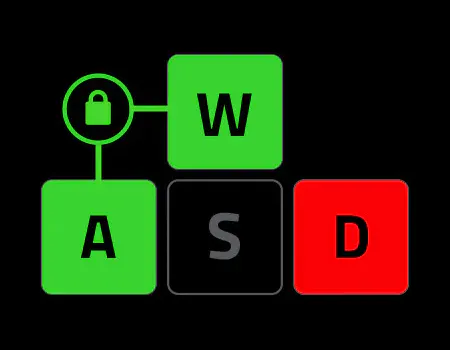
First Input
Extra Keys don’t override
-
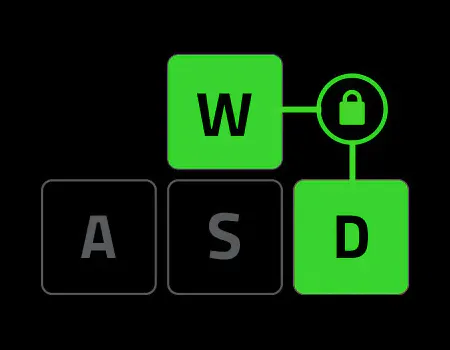
On release
Priority shifts to new pair
Release locked key
Description not needed: The visuals in this video animation only support what is spoken; the visuals do not provide additional information.
OPTIMIZED KEYSTROKE FEEL
Thick Foam Dampening and Lubricated Switches

TEXTURED DOUBLESHOT PBT KEYCAPS
Greater Resilience and Feel

Brushed Aluminum Top Plate
Enhanced Durability

Get more room for wide mouse swipes while keeping the dedicated keys competitive players rely on.

Designed for easy positioning and maximum space to maneuver your mouse, the keyboard compact design is also incredibly portable, making it the perfect pick to bring along for offline tournaments.
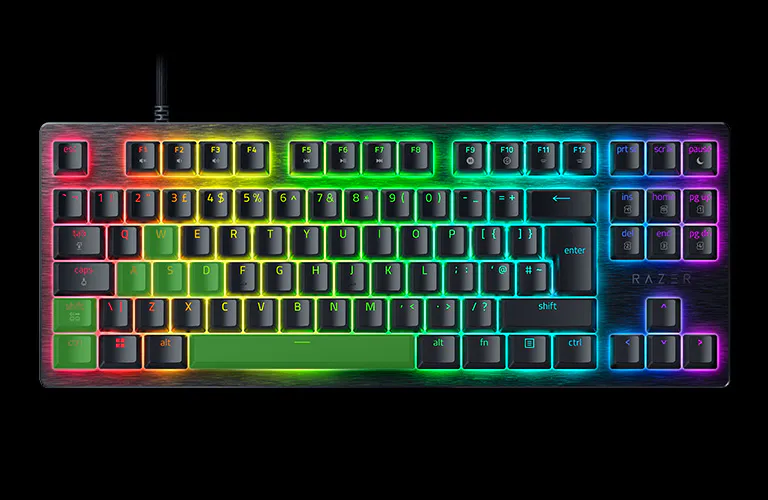
DOWNLOAD THE OFFICIAL MARVEL RIVALS PROFILE BY NETEASE GAMES
How to import profile

W
A
S
D
A
D
Razer™ Snap Tap - ON
L Shift
L Ctrl
Spacebar
2.0 MM ACTUATION POINT
This is a carousel. Use the control buttons to display the related slide.
We’ve Got You Covered
Get up to 2 years of warranty and access reliable tech support. Purchase directly from RazerStore and get 14 days risk‑free returns.
RAZER HUNTSMAN V3 HE MAGNETIC 8KHz - Frequently Asked Questions
-
What advantages does Snap Flex provide? Razer™ Snap Flex lets you assign two actions to a single key - one on press and another on release. This reduces the need to reach for multiple keys, making complex actions easier to perform and helping you react faster in-game. For FPS and MMO games, it can simplify advanced techniques, improve consistency, and reduce timing errors during critical moments. -
How do I ensure an 8KHz polling rate is active when using the keyboard? Polling rate can be adjusted in Razer Synapse. Ensure the selected polling rate is 8000 Hz. -
Can I hotswap the switches on the keyboard? No. The keyboard switches are not hot- swappable. Razer HE Magnetic Switches are already optimized to achieve incredible precision and latency speed. Switching them out will deteriorate the performance of the keyboard. -
What are the benefits of Dual-Keypress Priority? Dual-Keypress Priority helps keep your movement smooth and consistent when multiple keys are pressed at the same time. Instead of inputs conflicting with each other, your keyboard prioritizes the correct movement, giving you more precise control and reducing accidental input changes. For fast-paced games, this can make movement feel more reliable during fast-paced situations. -
What are the benefits of Rapid Trigger? With Rapid Trigger, keys reset the moment you begin lifting your finger—allowing repeated inputs to be executed far faster than on traditional keyboards. In FPS titles, where movement directly affects accuracy, this lets you regain shooting precision faster and engage opponents with greater confidence. -
Can I have more than a pair of assigned keys for Razer™ Snap Tap? Yes, the keyboard can save up to 4 pairs of assigned keys for Snap Tap. Choose your preferred keys via Razer Synapse. -
How many profiles can be stored on the keyboard? Access up to 6 onboard profiles at the touch of a hotkey. 2 profiles are optimized and preset out of the box, while 4 additional slots can be personalized with custom settings through Quick Onboard Adjustment Mode or Razer Synapse.
You may learn how to import or export profiles here. Download custom profiles via Workshop in Razer Synapse. -
How do I enable Rapid Trigger Mode? You can enable Rapid Trigger Mode through Razer Synapse under the keyboard’s Actuation tab. Additionally, you can also use the hotkey Fn + Caps Lock to enter the onboard Rapid Trigger Adjustment Mode. Rapid Trigger Mode is not available on Factory Default profile. -
What is the Factory Default Profile? It is an onboard profile that is set to a 2.0 mm actuation point with Rapid Trigger Mode off and is typically used for typing and non-gaming-related tasks. This profile is displayed as a green profile light and cannot be modified. -
What is the Last-used Synapse Profile? It is an onboard profile that remembers the latest keyboard settings used on Razer Synapse and is displayed as a white profile light. -
How do I ensure I am getting the best experience out of my keyboard? To achieve the best experience on the Razer Huntsman V3 HE Magnetic 8KHz Line, ensure the firmware and Razer Synapse have been updated to the latest versions. -
Can Snap Tap be used concurrently with Rapid Trigger? It works seamlessly with Rapid Trigger Mode to give gamers even more responsive in-game movements no matter the direction. -
How do I toggle Razer Snap Tap? Hit FN + Left Shift to immediately toggle Razer Snap Tap. The A and D keys are paired to this mode by default. Paired keys will light up white when Snap Tap is on and light up red when Snap Tap is off. Snap Tap can also be enabled through Razer Synapse, where you can customize it with your preferred key assignments. -
What is a Hall Effect magnetic keyboard? A Hall Effect magnetic keyboard uses contactless magnetic sensors to detect keypresses with exceptional precision. This enables advanced features such as adjustable actuation, Rapid Trigger, and enhanced durability beyond traditional mechanical switches. -
What is adjustable actuation on a gaming keyboard? Adjustable actuation allows players to customize how far a key needs to travel before registering an input, helping optimize the keyboard for gaming, typing, or esports competitions. -
Where can I buy the Razer Huntsman V3 HE Magnetic Tenkeyless 8KHz? You can purchase the keyboard directly from raizer.live, at select retail stores, or locate a RazerStore near you.